AetherSX2 Emulator
- 3.2
- Rating
- 50.00K
- Installs
- Free
- Price

 Analysis by App-foxy
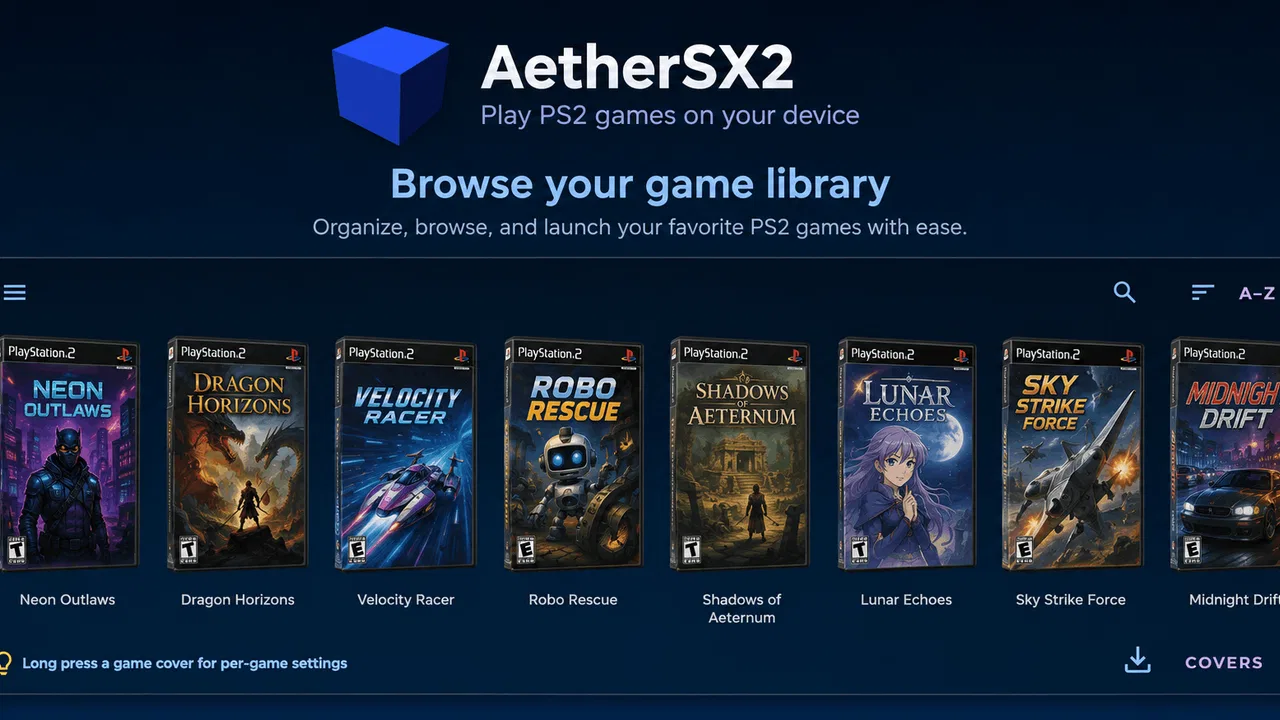
I spent time with AetherSX2 Emulator as an arcade game and found that its most important appeal is not a built-in game world, but the way it brings PlayStation 2 emulation tools together on Android. Its central capability is the combination of save states and HD upscaling, supported by cheats and gamepad compatibility. That makes it interesting for people who already have legally obtained game backups and want more control than a traditional console setup provides.
The experience is more technical than the store name might suggest. This is not an arcade game in the usual sense, where I open it and immediately start playing a self-contained title. Instead, it is an emulator from STE RIDA AGENCY, and its usefulness depends heavily on the games, controller, device, and files I bring to it. I would recommend approaching it as a tool for Android gaming rather than as a single downloadable game.
It is free and marked for Everyone, which makes trying it straightforward. The app has passed the fifty-thousand-install mark and holds a 3.2 average from 78 ratings, so the public response is mixed rather than universally enthusiastic. That matches my overall impression: the feature set is appealing, but emulation always involves more setup and more variables than ordinary mobile games.
You May Also Like

 Blood Strike: 2.5 Anniversary
Blood Strike’s Loadouts Turn Every Drop Into a Tactical Gamble
A close look at Blood Strike’s custom loadouts: how fast access to signature weapons reshapes its battle royale rhythm, rewards preparation, and narrows the gap between fights.

 Pandora - Music & Podcasts
Pandora’s Music Is Easy to Start, but Harder to Recover
Pandora’s strength is its low-effort path from a seed to a station. Its weak spot is how much confidence it asks you to place in connection, setup, and quiet recovery.

 8 Ball Pool
 Is Built on Rivalries, Rematches, and Routine
A close look at the rivalries, rematches, shared routines, and unanswered safety questions that turn a quick pool match into a persistent mobile community.

 Samsung Music
’s Quiet Strength Is Playing What You Already Own
Its reach comes less from spectacle than from dependable access to a personal library. That simplicity is both the app’s strongest retention engine and its ceiling.

 AccuWeather: Weather Radar
AccuWeather Review: A Quick, Clear Forecast for Everyday Decisions
For everyday plans, the best forecast is the one you can understand quickly. AccuWeather makes rain timing, radar, and local conditions easy to act on, with a few trade-offs.

 Hill Climb Racing
Why Hill Climb Racing Still Turns Crashes Into One More Run
A tiny car, a bumpy hill and one more upgrade: Hill Climb Racing keeps resurfacing because its simple chaos makes every near-miss feel personal.
More From Our News Desk
View All News


Save states are the feature that changes the experience
The capability I noticed most was save states. A normal console save usually happens at a particular point designed by the original game. A save state works differently: it captures the current emulation session so I can return to that exact moment later. In practical terms, this can make a long session easier to pause and can reduce the frustration of replaying a section simply because I need to leave.
That convenience is especially useful with older games built around fixed checkpoints. If I am exploring a lengthy area, testing a difficult encounter, or stopping before a cutscene, a save state gives me a flexible recovery point. I can close the app, return later, and continue from the captured moment instead of searching for the nearest in-game save location.
There is an important trade-off, though. Save states are not a replacement for the original game’s own save system. I would still use normal in-game saves whenever possible, because they are usually more portable and less dependent on the emulator session. A save state is best treated as a convenient extra layer: useful for short-term progress, experimentation, and interruptions, but not the only copy of important progress.
My practical advice is to keep a small routine. Before creating a state, I first make sure I know which game and point it belongs to. I avoid overwriting a reliable state with a risky experiment, and I make a normal in-game save after a meaningful milestone. This simple habit matters because the speed of save states can encourage careless saving. The feature is powerful precisely because it removes friction, but that also makes it easy to create confusion if several states are used without a clear system.
What HD upscaling changes on a phone
HD upscaling is the other feature that shapes the experience. Instead of displaying the original game image at its old internal resolution, the emulator can render it at a higher level and then show that result on a modern phone screen. Text, edges, and distant objects may look cleaner, particularly on a sharp display.
I found the benefit most noticeable when a game contains small menus, thin interface elements, or scenes with strong geometric lines. Older console imagery can look soft when enlarged directly, while upscaling gives it a more defined presentation. It does not redesign the original artwork or turn it into a modern game, but it can make the image feel less dated without changing the underlying content.
The setting is not automatically better for every device or every game. Higher rendering demands can place more pressure on the phone, and an image that looks clearer can still expose original texture limitations. I would begin conservatively, check whether the game remains stable, and only then increase visual quality. The best setting is the one that keeps play comfortable, not necessarily the highest option available.
This is where the app differs from playing through a basic mobile port. A port is normally adjusted by its developer for a particular phone environment, while an emulator has to translate another system’s behavior in real time. Upscaling gives me visual control, but it also reminds me that performance depends on the device and the individual game. A stronger-looking image is valuable only if it does not make the session unpleasant.
How the tools work together during a real session
A typical session begins with preparation rather than immediate play. I select a game from my own legally obtained collection, connect a compatible gamepad if I want a console-style layout, and check the display and save-state approach before settling in. Once everything is ready, the workflow becomes simple: play normally, create a state before a section I may want to retry, and use the higher-resolution presentation when the phone handles it comfortably.
The gamepad support is important because touch controls are not equally suitable for every older console title. A virtual layout can work for menus or slower games, but physical buttons provide better feedback for action-heavy play. I would not buy a controller solely for this app without first considering the games I plan to use, yet anyone who already owns a compatible pad has a clear reason to test the emulator.
Cheats add another layer of flexibility, although I see them as optional rather than central. They can help someone experiment, revisit content with fewer restrictions, or make a difficult game more approachable. At the same time, using them can change the balance and sense of achievement. I prefer to finish a first serious attempt without them, then use them for testing or replaying once I understand what the original game was trying to do.
The most useful workflow I found was to separate three purposes: ordinary play, temporary save states, and experimentation with cheats. Keeping those purposes distinct makes the app feel more controlled. If everything is mixed together, it becomes harder to remember whether I am continuing a genuine playthrough or testing a modified one.
A realistic everyday scenario for the emulator
Imagine that I have a long commute and only a short window for gaming at home later. With a conventional console, I might need to reach a proper save point before stopping. With this emulator, I can create a temporary state at the end of a short session and return to that exact moment when I have time again. If I use a gamepad at home, the transition from phone screen to controller feels more natural than relying on touch buttons.
Another useful situation is revisiting a demanding section. I can save just before it, attempt the challenge, and reload if I want to practice a particular sequence. This does not make the game easier in a permanent sense, but it lets me focus on learning rather than replaying a long lead-up. For older titles with limited checkpoints, that can change the rhythm of the entire experience.
HD upscaling helps in this scenario when the phone screen is larger or sharper than the original television display. Menus become easier to read and the picture can feel cleaner during a short session. Still, I would check the phone’s comfort and battery behavior before planning long play periods. The emulator’s value is convenience, not a guarantee that every device will deliver the same result.
Where it feels less convenient than a normal mobile game
The biggest friction is the setup. A standard Android arcade title usually includes its own content, controls, and save process. Here, I need to understand the emulator concept, manage my own game files, and make sure the chosen title is appropriate for the device. That is a reasonable exchange for flexibility, but it makes the app a poor fit for someone who wants instant, uncomplicated play.
There is also a learning curve around save states. New users may assume that every saved moment is as dependable as an in-game save, then become frustrated if they organize states carelessly. I would spend a few minutes learning the difference before starting a long playthrough. That small investment prevents the most avoidable mistakes.
The mixed 3.2 average rating is worth considering as a signal that the experience may not be equally smooth for everyone. I would not interpret it as proof that the app is unusable, but I also would not expect console-level consistency from every Android phone. Emulation is sensitive to hardware, game behavior, display settings, and controller setup, so a person choosing this app should be comfortable with occasional adjustment.
The release is listed as Aug 5, 2026, and the current version is 1.0.0. That version context makes me approach it as an early release rather than a mature tool with a long visible history. I would be especially careful about building my entire gaming routine around it until I have tested the games and save workflow that matter to me.
When another option may be better
If I only want quick arcade rounds, a dedicated arcade game is a better choice. It will open faster, require less configuration, and usually explain its controls immediately. This emulator makes more sense when I specifically want access to PlayStation 2-era software and value save states, sharper rendering, cheats, or physical controls.
A native remake or official mobile release can also be preferable when one exists. Native versions are typically designed around current screens and touch input, while emulation preserves the original experience with all its older assumptions. I would choose the native version for convenience and the emulator when authenticity, flexibility, or access to the original presentation matters more.
For someone who already plays on original hardware and wants the most faithful living-room experience, a phone emulator may not replace the console. The smaller screen, touch option, and device-dependent performance can feel like compromises. On the other hand, for travel, short sessions, or a personal collection that is difficult to keep connected to a television, the portability is a meaningful advantage.
Who gets the most from this app
I think the strongest audience is an Android user who understands the basics of emulation, owns games they are entitled to use, and wants a flexible way to revisit them. That person can take advantage of all four headline tools without treating any one of them as magic. Save states support interrupted schedules, HD upscaling improves presentation, cheats enable experimentation, and gamepad support makes demanding controls more manageable.
It is also a good match for someone who likes adjusting a setup until it feels right. The app rewards a little patience: test a game, choose a sensible visual level, confirm the controller layout, and establish a reliable saving habit. Users who enjoy that process may find more value here than in a polished but fixed mobile port.
I would ask beginners to start with one game rather than loading a large collection immediately. Learn how states behave, check how the image looks on the phone, and decide whether touch controls are acceptable before buying extra accessories. This approach makes it easier to identify whether a problem comes from the app, the game, the controller, or the device.
I would skip it if I want a self-contained free game, dislike technical setup, or expect every title to behave identically. The Everyone age rating and free price make the initial barrier low, but they do not remove the practical work involved in using an emulator responsibly. The app is accessible to try, yet its best results come from a user willing to manage the experience.
My recommendation after using the feature set
My view is cautiously positive. The combination of save states and HD upscaling gives this arcade-category emulator a clear purpose: it can make older console gaming more flexible and more comfortable on Android. Gamepad support strengthens that purpose, while cheats are a useful extra for players who want to experiment rather than follow a strictly original playthrough.
I would recommend it to a curious Android player with suitable game files and realistic expectations about emulation. I would begin with a normal in-game save, add temporary states for convenience, and increase image quality gradually instead of chasing the most demanding setting. That workflow captures the app’s strengths while reducing the risk of losing progress or creating an unstable session.
In the end, this is not the right download for everyone, and its average rating reflects a product that may require patience. But for the right person, AetherSX2 Emulator offers something more useful than a simple visual filter: it changes how I fit older games into modern routines. Its best feature is the control it gives the player over when to stop, where to resume, and how the original image appears on a current Android screen.
FAQs for AetherSX2 Emulator
01What is AetherSX2 Emulator, and what can it do?
AetherSX2 is an Android emulator designed to run PlayStation 2 games on compatible phones and tablets. In testing, it provided options for virtual controls, external controllers, save states, graphical enhancements, and per-game configuration. However, performance depends heavily on your device’s processor, graphics hardware, and the game being emulated, so results can range from smooth gameplay to significant slowdown.
02What Android device is recommended for running AetherSX2 smoothly?
AetherSX2 generally performs best on newer Android devices with a powerful Snapdragon chipset and a modern Adreno GPU, although some MediaTek and other processors can also work well. A stronger device allows higher resolutions and more stable frame rates. Older or entry-level phones may run simpler games acceptably but can struggle with demanding titles, overheating, audio crackling, or frequent frame drops.
03Does AetherSX2 include PlayStation 2 games, BIOS files, or game downloads?
No. AetherSX2 does not legally provide PlayStation 2 games, commercial downloads, or copyrighted BIOS files. You are expected to use games and system files obtained from hardware and software that you own, following the laws applicable in your country. The app functions as an emulator and requires users to prepare their own legally sourced files before attempting to play.
04Does AetherSX2 support controllers, save states, and graphics settings?
Yes. The emulator supports touchscreen controls as well as many Bluetooth, USB, and compatible game controllers. It also offers memory-card support and save states, which are useful for quickly continuing a game. Graphics settings include resolution scaling, frame-rate options, widescreen adjustments, and performance-related features, but increasing visual quality can place considerable extra demand on your device.
05Is AetherSX2 safe to download, and is it still actively updated?
AetherSX2 became popular because it offered strong PlayStation 2 emulation with relatively few intrusive features, but development has not continued in the same way as a regularly updated commercial app. For safety, download it only from a trustworthy, verifiable source and avoid unofficial modified APKs that may contain malware. Before installing, check permissions, user feedback, device compatibility, and the authenticity of the download.
Pros
- Excellent performance on many mid-range and flagship Android phones.
- Supports save states
- memory cards
- and multiple controller configurations.
- Offers useful graphics enhancements such as widescreen and texture filtering.
- Works offline once games and BIOS files are properly configured.
- Includes per-game settings for fine-tuning demanding PlayStation 2 titles.
Cons
- Only available for Android
- with no official iOS version.
- Requires legally obtained BIOS files and game backups from the user.
- Some games need extensive settings changes to run smoothly.
- Can drain battery quickly and make phones noticeably warm.
- Development has stopped
- so future compatibility improvements are unlikely.

AetherSX2 Emulator
Gallery